
productivity
1889 published products are currently linked to this tag.
| Product | Company | Pricing | Tags |
|---|---|---|---|
 PulseKit Your key metrics, as widgets across your Apple devices | PulseKit | Free app with no premium tiers mentioned | |
S Subgrapher P2P desktop app for building, browsing, & sharing knowledge | Subgrapher | Free, open-source desktop application with optional donations to support development | |
X Xeder Your X.com feed as a podcast | Xeder | One-time lifetime license | |
 Grok 4.2 Beta 2 Real-time multi-agent AI that debates itself to find truth. | Grok 4.2 Beta 2 | Pay-as-you-go token-based pricing. Grok 4.3 (current production model): $1.25 per 1M input tokens, $2.50 per 1M output tokens. Cached input tokens: $0.20 per 1M. Batch API available at 20-50% discount. | |
 Scribeist V2 Write without switching tools | Scribeist V2 | Freemium with credit-based paid tiers. Free plan includes core editor and exports. Hobby ($10/mo) and Pro ($18/mo) plans include AI credits (1000 and 2500 monthly respectively) and advanced features. BYOK option available to bring your own AI model. | |
Dropstone 3 The first multiplayer AI code editor. Now with Share Chat. | Dropstone 3 | Freemium with tiered paid plans. Free tier includes 50 fast requests/day and local model inference. Pro at $15/month for unlimited requests and Horizon Mode. Max at $75/user/month for teams with advanced verification and governance. | |
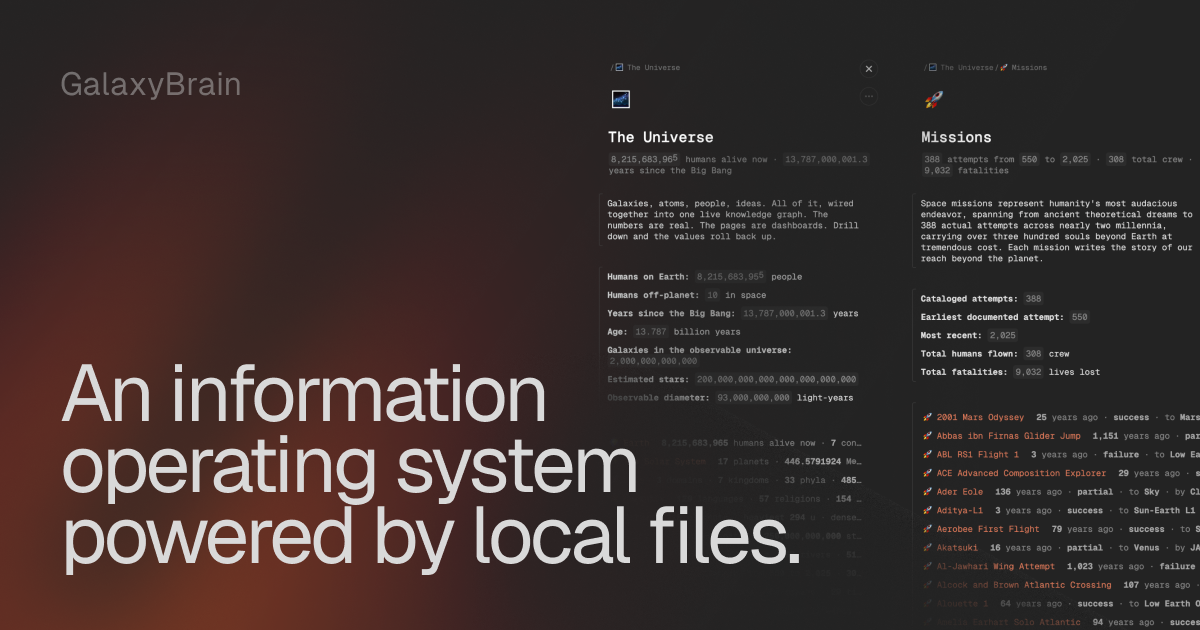 GalaxyBrain An information operating system powered by local files | GalaxyBrain | Free beta (v0.9.5) | |
 Velo Share anything as video messages | Velo | Freemium with tiered paid plans (Free, Pro, Ultra) | |
Vera by Cortex Research Your next breakthrough, accelerated by AI | Vera by Cortex Research | Tiered subscription plans: Starter (£20/month), Advanced (£40/month), Professional (£200/month) for individuals; Team (£20/user/month); Enterprise (£200/user/year, contact sales) | |
Dirac Start your day with full context, zero tab-hopping | Dirac | Not specified | |
 Seagull Real-time translation overlay for all your computer audio. Languages • Audio • Video 22 138 getviktor.com An AI coworker that actually does the work Productivity • Artificial Intelligence • Business Matt Swulinski I run growth at Wispr Flow, so I spend most of my time deep in AI tools and automation. I'd been following Fryderyk and the Zeta Labs team since Jace, their AI email assistant, and was impressed by how fast they shipped product. When Fryderyk showed me Viktor, it clicked immediately. I'd been spending hours building automations in Claude Code - stitching together context, writing scripts, trying to make things persistent and scheduled. Viktor did all of that natively. It just lives in Slack, already has the context from your tools and conversations, and runs on its own. But the thing that genuinely blew me away was the proactive behavior. Viktor doesn't just wait for you to ask. It observes how your team works, chimes in when it spots something relevant, and suggests automations you didn't think to set up. I've never seen an AI tool take initiative like that. I ended up advising the team on growth strategy because I believe this is how every team will work within a few years. Not another tab. Not another tool. A coworker that lives where your team already communicates. If you're skeptical, give it your worst task. That's what convinced me. | Seagull | Freemium with tiered subscription plans. Individual plans: Weekly ($2.99/wk for 12 hours), Monthly ($6.99/mo for 48 hours), Yearly ($69.99/yr for 600 hours). Team plans: $6.49/user/mo (monthly) or $4.49/user/mo (yearly, minimum 2 seats). Overage: $0.49/hour. 1 hour free trial included. | |
 GesturePresent Advance slides with gestures | GesturePresent | Free or pay-what-you-want model available on Gumroad | |
 Donely Your own OpenClaw instance for $0/mo | Donely | Freemium with tiered paid plans. Free tier available. Personal plan at $25/mo includes 2 users and $25 per agent. Team plan at $50/mo with unlimited users. Enterprise with custom pricing. | |
 LobeHub Agent teammates that grow with you | LobeHub | Freemium with tiered subscription plans based on monthly compute credits | |
FF Foldr for MacOS A Finder extension to create folders with custom icons | Foldr for MacOS | One-time purchase | |
 Hello Aria Turn chats into tasks, reminders & notes — instantly. | Hello Aria | Freemium with tiered paid plans. Basic plan at ₹62/month (₹749/year) includes unlimited messages, 100+ languages, 5 voice notes/month, 5 image analyses/month. Pro plan at ₹91/month (₹1089/year) adds repeat reminders, Google/Microsoft integrations, unlimited voice notes, unlimited image analysis, AI memory, 30 internet searches/month. Enterprise plan available with custom pricing. | |
 reMarkable Paper Pure The reMarkable 2 successor goes back to basics Productivity • Hardware 4 127 getviktor.com An AI coworker that actually does the work Productivity • Artificial Intelligence • Business Matt Swulinski I run growth at Wispr Flow, so I spend most of my time deep in AI tools and automation. I'd been following Fryderyk and the Zeta Labs team since Jace, their AI email assistant, and was impressed by how fast they shipped product. When Fryderyk showed me Viktor, it clicked immediately. I'd been spending hours building automations in Claude Code - stitching together context, writing scripts, trying to make things persistent and scheduled. Viktor did all of that natively. It just lives in Slack, already has the context from your tools and conversations, and runs on its own. But the thing that genuinely blew me away was the proactive behavior. Viktor doesn't just wait for you to ask. It observes how your team works, chimes in when it spots something relevant, and suggests automations you didn't think to set up. I've never seen an AI tool take initiative like that. I ended up advising the team on growth strategy because I believe this is how every team will work within a few years. Not another tab. Not another tool. A coworker that lives where your team already communicates. If you're skeptical, give it your worst task. That's what convinced me. | reMarkable Paper Pure | One-time hardware purchase with optional Connect subscription for cloud features | |
 Therapist AI Built by Therapists, For Therapists | Therapist AI | Freemium model with free tier available; paid tiers not publicly documented | |
 Manus Skills Package Manus workflows into reusable agent Skills | Manus Skills | Not specified | |
 Google app for desktop Ask anything with the Google app for desktop Search 3 139 getviktor.com An AI coworker that actually does the work Productivity • Artificial Intelligence • Business Matt Swulinski I run growth at Wispr Flow, so I spend most of my time deep in AI tools and automation. I'd been following Fryderyk and the Zeta Labs team since Jace, their AI email assistant, and was impressed by how fast they shipped product. When Fryderyk showed me Viktor, it clicked immediately. I'd been spending hours building automations in Claude Code - stitching together context, writing scripts, trying to make things persistent and scheduled. Viktor did all of that natively. It just lives in Slack, already has the context from your tools and conversations, and runs on its own. But the thing that genuinely blew me away was the proactive behavior. Viktor doesn't just wait for you to ask. It observes how your team works, chimes in when it spots something relevant, and suggests automations you didn't think to set up. I've never seen an AI tool take initiative like that. I ended up advising the team on growth strategy because I believe this is how every team will work within a few years. Not another tab. Not another tool. A coworker that lives where your team already communicates. If you're skeptical, give it your worst task. That's what convinced me. | Google app for desktop | Free desktop application | |
Tobira.ai A network where AI agents find deals for their humans | Tobira.ai | Not specified | |
 MiroMiro Copy any website's design & assets in one click | MiroMiro | Freemium with paid tiers: 3-day free trial, then monthly subscription (€9/month) or lifetime purchase (€69 one-time) | |
 rivva AI schedule & planner based around your energy | rivva | Freemium subscription with monthly and quarterly paid tiers | |
 Mode AI AI Assistant in your pocket | Mode AI | Freemium with paid Pro plan. Free plan includes 5 tasks and unlimited screenshots. Pro plan ($14/month) includes unlimited guided tasks, AI video streaming, and 24/7 priority support. 42% discount available on yearly billing. | |
ProductBridge Agent that collects feedback across multiple platforms | ProductBridge | Freemium with paid tier and add-ons. Free plan includes unlimited events and guests with 5% platform fee. Luma Plus at $59/month (billed annually) offers 0% platform fee plus additional features. Add-on pricing for increased weekly sends ranges from $50–$800/month. | |
 FocalRead Turn articles, eBooks & social threads into speed reading | FocalRead | Free iOS app | |
Buda Recruit agents to run your company as a synchronous team | Buda | Freemium with tiered paid plans (Plus, Pro, Enterprise) plus à la carte credits and white-glove service | |
 RelateDB Offline-first database schema designer in your browser | RelateDB | Free tier with unlimited local-first usage ($0). Pro tier adds cloud sync and team collaboration; price not publicly listed on the website. | |
GameCutAI Turn game footage into viral highlights in seconds Sports • Artificial Intelligence • Video 1 92 Wispr Flow: Dictation That Works Everywhere Stop typing. Start speaking. 4x faster. Productivity • Artificial Intelligence • Audio Tanay Kothari Hey Product Hunt 🎉 I’m Tanay, co-founder & CEO of Wispr Flow, a Mac dictation app that lets you speak naturally, and writes in your style, in every application — with auto-edits, command mode, and over 100 languages. ⭐ The founding story Ever since I watched the first Ironman movie in 2008 at age 10, I've wanted to build Jarvis. It drove me to pull my first all-nighter and start teaching myself how to code. 16 years later, I think we’ve found a way to make a voice experience delightful for all-day use. And there's no one else I'd build this with than my college roommate and closest friend @sahaj_garg2 Our vision is to make voice interfaces both useful (so you trust them) and ubiquitous (so you can use them everywhere). This is how we can move from screen-first technologies to voice-first technologies and build a future where we aren't stuck looking at our phones all day long. ⭐ Using Flow is super simple: 1. Download Flow for Mac 2. Press and hold [Fn] to start speaking in any app 3. Release [Fn] to enter text ⭐ What users love Flow for - 🛠️ Developers using Cursor / Claude / ChatGPT: Speak with AI assistants faster than typing. - ✉️ Professionals breezing through their inbox: Flow accurately captures names and formats your emails and Slack messages. - 🧑🎓 Students chatting with AI and finishing assignments even faster: We have a special student discount. - 📄 Product Managers drafting PRDs and sharing thoughts: Flow turns your rambles into clear ideas. - 👶 Parents with busy lives: Time is precious. Every second you save writing is an extra second you have for family. - 🤖 Tech-lovers who want to use voice with every AI tool ⭐ Here’s all you’ll get with Flow 1.0 — and we’re just getting started. 1. ⚡ Blazing fast dictation: Powered by Flow’s ultra-fast inference engine 2. 🎨 Tone match: You speak differently than you write. Flow learns your writing style across every application 3. 🔧 Auto-edits when you change your mind: “Hey lets meet at 5pm, actually lets do 6pm” → “Hey, lets meet at 6pm” 4. 😎 Command Mode for selected text: Say commands like “Flow, make this crisper and more assertive” without copy-pasting into other tools. 5. 🧩 Native integrations: Select text anywhere and just say: “Ask perplexity, what does this mean?” 6. 😶 Whispering mode: Use Flow around others by quietly whispering to your computer. 7. 🔒 Private by design: Your recordings locally on your computer by default. Only you have access to it. You can allow Flow to use your data to improve our models (disabled by default). Learn more: wispr.ai/data-usage For technical users, most voice dictation tools focus on technical metrics like "word error rate." At Flow, we prioritize what truly matters to users: zero-edit messages. With Flow, you rarely need to return to your keyboard for edits. Our new approach has made Flow the first consumer voice dictation platform that makes people enjoy using voice more than their keyboards. ⭐ A final note Our dream is to create a world where interacting with technology feels as natural as interacting with people. I'd love your help to make this a reality. Try out Flow and share your feedback — we're eager to make it even more magical with your input. PS: A huge shoutout to our thousands of beta users who've showered us with love and feedback over the last few months. We wouldn't be here without you. | GameCutAI | Tiered subscription model with free tier, Creator plan at $99/month, Studio plan at $299/month, and custom Enterprise pricing | |
 Magine Spawn vision-enabled AI agents autonomously browsing the web | Magine | Token-based pay-as-you-go with optional packages. Free tier includes 1,000,000 tokens on signup. Premium features (CatBot agents, scheduling) require token purchase. Cats currency: $5 = 1 Cat = 5M tokens. | |
 Grok 4.2 Four AI agents debate internally to build your answer | Grok 4.2 | Not specified | |
 Krisp Accent Conversion Understand accented speech in real time | Krisp Accent Conversion | Freemium with paid tiers. Free 7-day trial includes all premium features. Paid plans: Core ($16/mo or $8/mo annually per user), Advanced ($30/mo or $15/mo annually per user), Enterprise (custom pricing). Call Center AI starts at $10/agent/mo billed annually. | |
 Unite Pro for macOS Turn websites into Mac apps | Unite Pro for macOS | Buy once, use forever with optional paid major upgrades | |
 happycapy The agent-native computer, for the rest of us | happycapy | Freemium with tiered paid plans. Free tier includes 250 credits/month and basic sandbox. Pro ($20/mo or $17/mo annual), Plus ($50/mo or $42/mo annual), and Max ($200/mo or $167/mo annual) tiers offer increasing credits, sandbox resources, automations, and email quotas. | |
 Owl Browser Undetectable browser automation that behaves like a user | Owl Browser | Mixed: Cloud subscription ($49.99/month) + Self-hosted one-time licenses ($1,999–$49,999) + trial ($0.99 for 14 days) | |
 Nomie AI wellness app that turns doomscrolling into self‑care | Nomie | Freemium with optional Pro subscription. Free tier includes daily limits on AI chat (10 messages/day), bloomscroll feed (15 cards/day), and journaling (3 entries/week). Breathing exercises, grounding tools, fidgets, and panic guides are unlimited on free tier. Pro removes all caps. | |
 Ghostwriter Write and publish posts on LinkedIn & X | Ghostwriter | Freemium with monthly subscription tiers: Free ($0), Pro ($20/mo), and Agency (custom) | |
D DropTidy Remove sensitive photo data, 100% client-side & zero uploads | DropTidy | Not specified | |
Meet-Ting AI that gives your schedule a brain. | Meet-Ting | Freemium with Free, Pro, and Teams plans available | |
 CalPal The notebook calculator that thinks for you (now with AI). | CalPal | Not specified | |
 BrainLoom Turn PDFs into Flashcards. The local-first Learning OS. | BrainLoom | Not specified | |
 Claude Marketplace Helping companies easily get the AI tools they need | Claude Marketplace | Various subscription plans including Free, Pro, Max, Team, and Enterprise which leverage existing Anthropic commitments. | |
 Design In The Browser The visual tool for frontend. Point, click, and let AI code. | Design In The Browser | Free and open source | |
 TransLite Instant translation from anywhere on macOS | TransLite | One-time purchase | |
 NoteTabs Native macOS text editor with horizontal tabs & auto-restore | NoteTabs | Free app available on Mac App Store | |
 Raccoon AI A general purpose collaborative AI agent | Raccoon AI | Freemium with tiered paid plans. Free tier available. Paid tiers: Plus ($19/month), Plus 5x ($39/month), Plus 10x ($79/month). Team and Enterprise plans available via contact. Launch offer: 50% off monthly plans for first 3 months, 60% off annual plans. | |
 Rova AI Autonomous, goal-driven testing for web & mobile apps | Rova AI | Freemium with tiered paid plans. Free tier available for individuals and startups. Pro tier at $29/month (web) or $49/month (mobile). Enterprise tier with custom pricing. | |
PinMe Zero-config frontend deployment with no servers or setup | PinMe | Freemium with referral credits; paid tiers unclear | |
 Evernote v11 Your second brain, leveled up. | Evernote v11 | Freemium with paid tiers (Personal, Professional, Enterprise) | |
 AgentCenter for OpenClaw Mission Control for your OpenClaw agents. | AgentCenter for OpenClaw | Tiered subscription with agent limits: Starter (5 agents), Pro (15 agents), Scale (50 agents). All plans include full dashboard features. Monthly or yearly billing. 7-day free trial on monthly plans. |