Access AI tools like Canvas and image creation without leaving the browser
Powerful AI tools including Canvas and image generation are accessible directly from the plus menu in Chrome, eliminating the need to switch to separate applications or tabs.

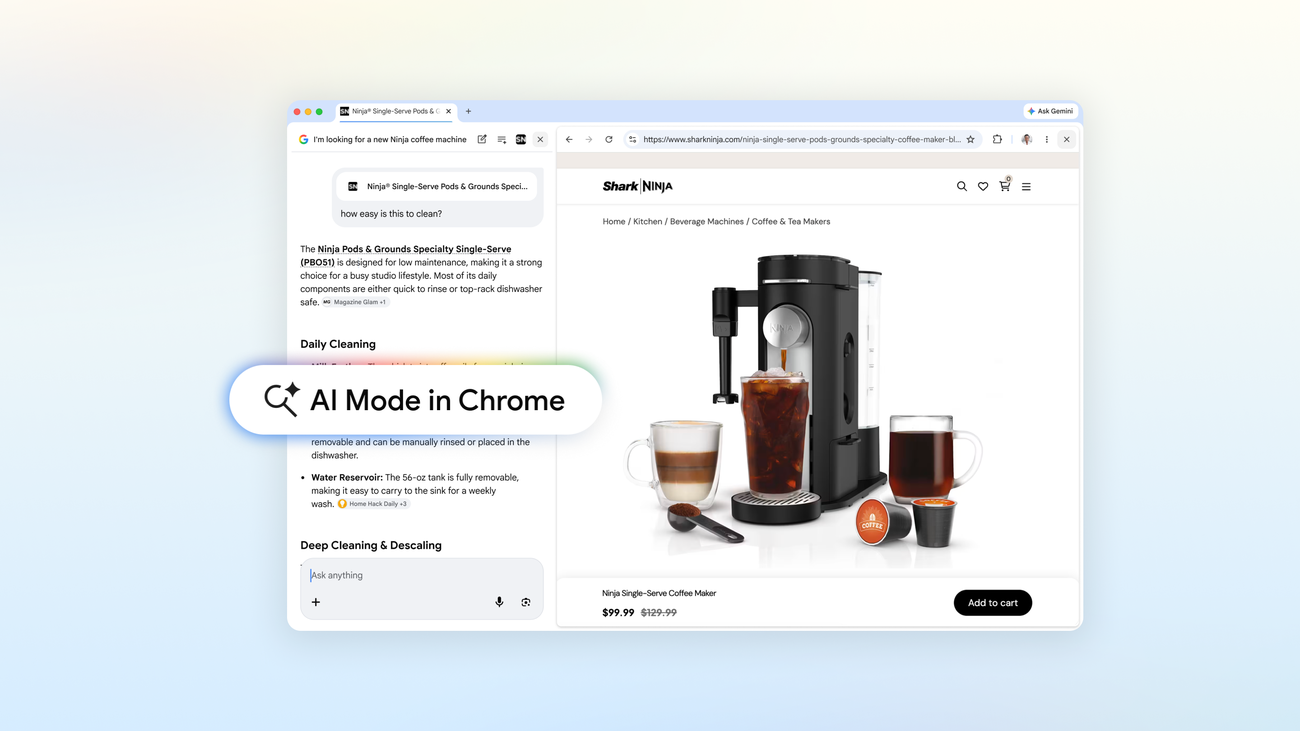
Browse and search side-by-side, without switching tabs
AI Mode in Chrome opens websites alongside your search so you can ask follow-up questions in context. Add open tabs, images, or PDFs as inputs. For everyday Chrome users on desktop.
Powerful AI tools including Canvas and image generation are accessible directly from the plus menu in Chrome, eliminating the need to switch to separate applications or tabs.
Users can add recent Chrome tabs, images, and files (PDFs) to AI Mode searches via the plus menu, allowing AI to provide tailored responses using that context. Example: researching hiking trails by combining multiple open sites, or studying statistics by mixing class notes, lecture slides, and academic papers.
AI Mode opens webpages side-by-side with search results, allowing users to ask follow-up questions about specific products without losing context or switching tabs. Example: shopping for a coffee maker, opening retailer sites alongside AI Mode to ask detailed questions like 'How easy is this to clean?'
AI Mode in Chrome enables seamless exploration of related pages (e.g., McLaren Racing official site) without breaking workflow. Users can ask real-time follow-up questions as they navigate, creating a fluid discovery process across multiple web pages.